

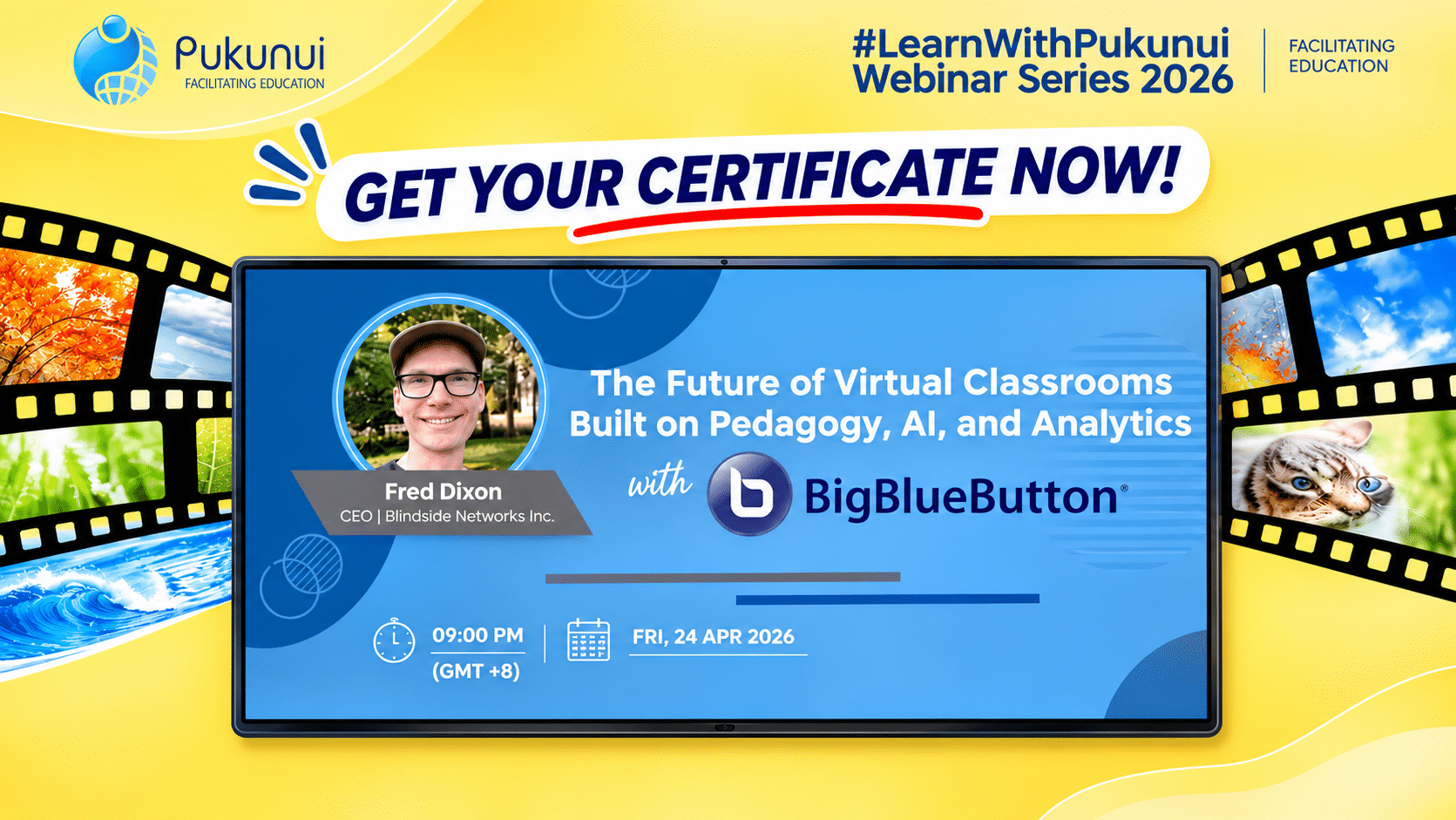
Post-Webinar Insights from the Fourth #LearnWithPukunui Webinar with Fred Dixon
Virtual classrooms have become an established part of modern education. However, simply moving a traditional classroom or lecture online does not automatically create an effective learning experience.
The real challenge is ensuring that students remain engaged, participate actively and develop a meaningful understanding of what they are learning.
How can technology help educators achieve this? And what roles should artificial intelligence (AI) and learning analytics play in shaping the next generation of virtual classrooms?
These questions were explored during the fourth #LearnWithPukunui webinar, The Future of Virtual Classrooms: Pedagogy, AI and Analytics, featuring Fred Dixon, CEO of Blindside Networks and Co-founder of BigBlueButton.
The session examined how virtual classrooms can move beyond conventional video conferencing to become more interactive learning environments. Fred shared his perspectives on the importance of pedagogy, the responsible use of AI, student engagement and the role of real-time analytics in helping educators make better teaching decisions.
One message stood out throughout the discussion: the future of virtual learning is not about replacing educators with technology. It is about using technology to strengthen teaching and human connection.
Virtual Classrooms Should Be Designed for Learning, Not Just Meetings
One of the central themes of the webinar was the difference between a video conferencing session and a purpose-built virtual classroom.
Many video conferencing platforms were originally developed for workplace communication and meetings. Although they allow people to connect remotely, their features do not always address the specific requirements of teaching and learning.
In an educational setting, students should not simply log in, listen to a presentation and leave. Effective learning requires opportunities to respond, reflect, interact and demonstrate understanding.
Fred highlighted the risk of passive participation and cognitive offloading, where learners become overly dependent on technology instead of actively processing information.
A virtual classroom should therefore be designed around the learning process. It should provide opportunities for interaction, encourage participation and help educators understand whether students are following the lesson.
The question is not simply whether students are attending an online class, but whether they are actively learning.
The Oreo Cookie Analogy: Why Learning Should Not Always Feel Easy
One of the more memorable moments from the webinar was Fred’s comparison between over-reliance on AI and eating an ultra-processed Oreo cookie.
The analogy illustrated how something can feel convenient and satisfying in the moment without necessarily providing lasting value.
A similar situation can occur when students depend too heavily on AI to complete assignments. They may finish their work more quickly, but if they are not actively thinking through the material, their understanding and long-term retention may be limited.
Fred discussed the importance of System 2 thinking, which involves slower, more deliberate and effortful mental processing.
He compared the experience to physical exercise. Muscle growth requires effort, and the process can sometimes be uncomfortable. Similarly, learning often involves questioning, struggling with difficult concepts and working through problems.
These moments of mental effort are important because they encourage learners to process information rather than simply receive answers.
For educators, this raises an important consideration when introducing AI into learning activities: are students using AI to support their understanding, or allowing it to do the thinking for them?
AI should help learners engage more meaningfully with knowledge, not remove the thinking process altogether.
Bringing Pedagogy into the Virtual Classroom
Technology alone does not create effective learning. The teaching approach, learning activities and support provided to students remain essential.
During the webinar, Fred referred to the Zone of Proximal Development (ZPD), which describes the space between what a learner can achieve independently and what they can accomplish with appropriate guidance.
Learning becomes meaningful when students are challenged beyond their current level of ability but receive enough support to progress.
This is where educators play an important role.
They provide guidance, explain difficult concepts, offer feedback and help students work through challenges. Technology should make this process easier rather than replace the educator’s involvement.
In a virtual classroom, this means providing opportunities for students to participate, receive feedback and demonstrate their understanding throughout the session.
The platform should support the pedagogy, not dictate it.
How BigBlueButton Supports More Interactive Virtual Classrooms
As Co-founder of BigBlueButton, Fred also shared how purpose-built virtual classroom features can support more active teaching and learning.
Several capabilities were highlighted during the session.
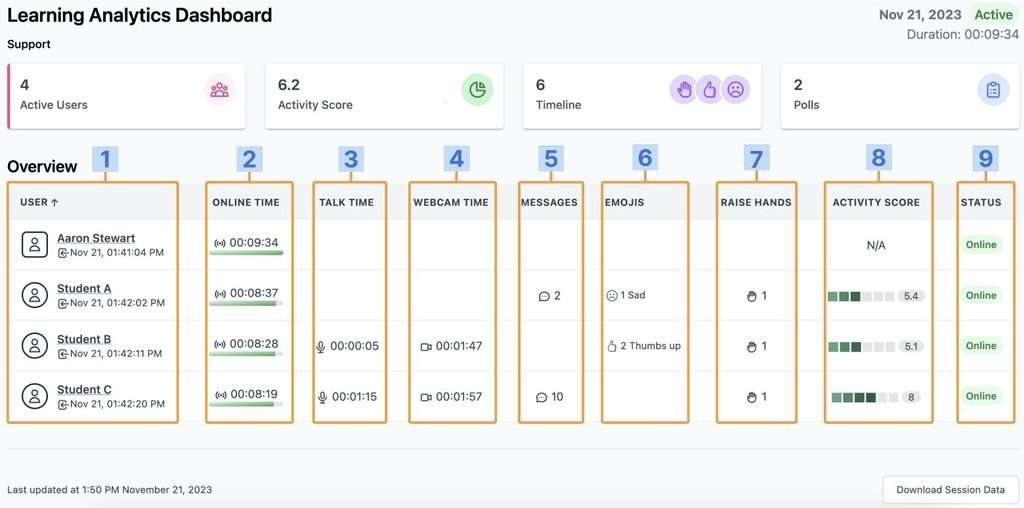
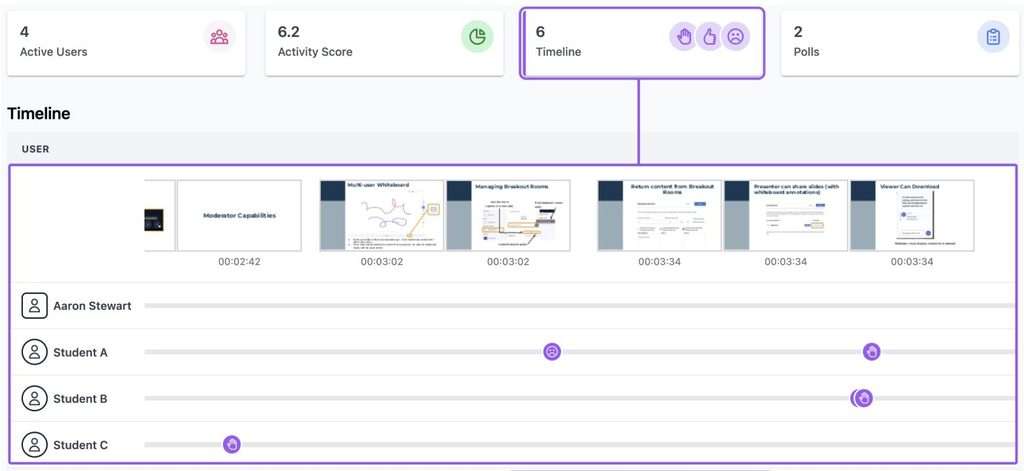
1. Live Analytics: Understanding Student Participation
In a physical classroom, educators can often identify disengaged students through observation. They may notice who is participating, who appears confused and who needs additional support.
In a virtual classroom, these signals can be more difficult to recognise.
Students may turn off their cameras, remain silent or appear to be attending while not actively following the lesson.
Fred discussed how BigBlueButton’s live analytics can help educators gain insights into student participation during a session.
By monitoring engagement, educators can identify learners who may need additional attention and respond while the lesson is still taking place.
This moves online teaching beyond simply checking attendance towards understanding participation.
2. Smart Slides: Making Presentations More Interactive
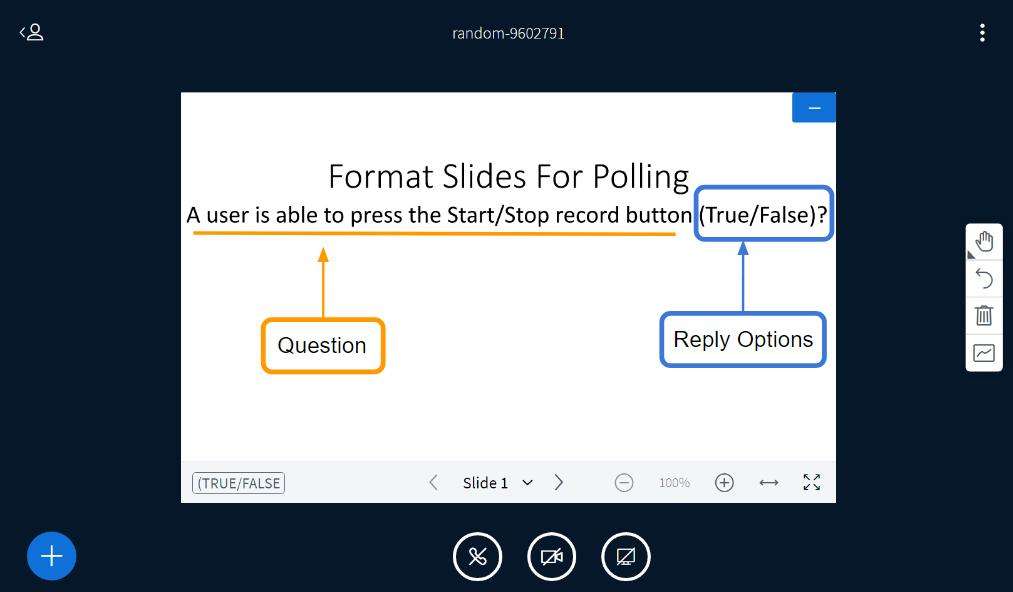
Another feature demonstrated was Smart Slides.
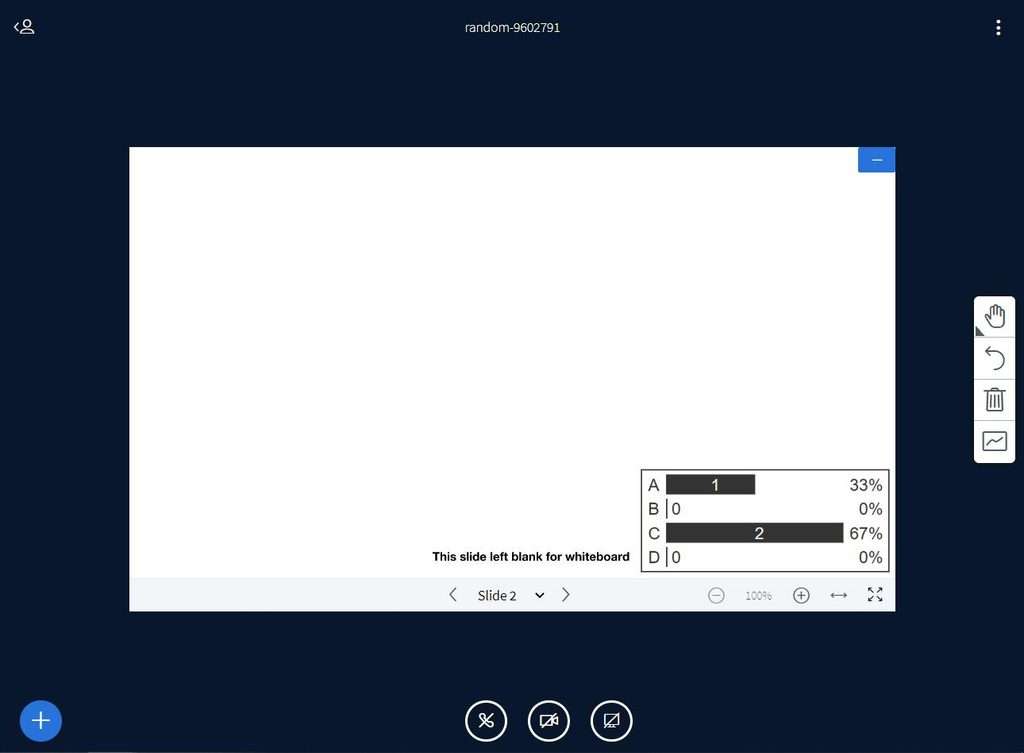
Smart Slides can detect poll questions embedded in presentation slides and allow educators to launch polls directly during a lesson.
This helps reduce interruptions to the teaching flow. Instead of switching between different tools or manually setting up a poll, educators can use questions within their presentation to encourage student responses.
Polls also provide an opportunity to check understanding, collect opinions and encourage participation.
3. Multi-User Whiteboards: Seeing How Students Think
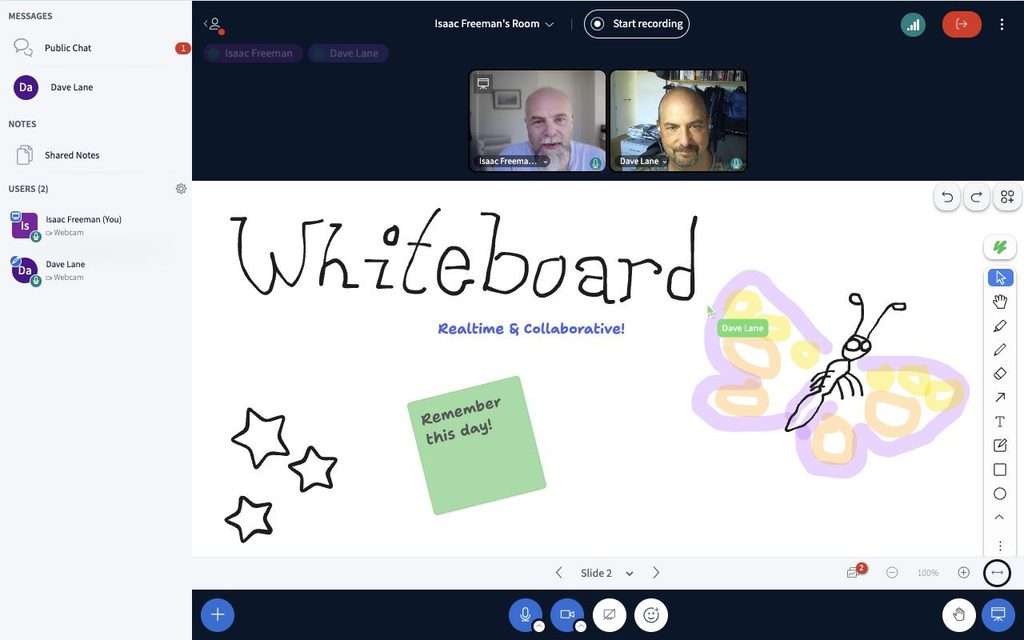
The webinar also explored the use of multi-user whiteboards for visual assessment and interaction.
Students can work on a shared whiteboard, allowing educators to observe their responses and understand how they approach a question.
Fred demonstrated how instructors can view students’ cursor activity simultaneously, while students see their own responses.
This provides educators with an opportunity to assess understanding across the class and identify misconceptions that may otherwise go unnoticed.
Rather than waiting until an assignment or examination to discover that students have misunderstood a topic, educators can address confusion during the lesson itself.
Using AI to Support Educators, Not Replace Students’ Thinking
While the webinar explored the risks of excessive AI dependence among students, it also highlighted how AI can be used positively in education.
Fred encouraged educators to consider AI as a productivity tool that can reduce repetitive tasks and free up time for more meaningful teaching activities.
Examples discussed during the session included:
- Generating quiz questions based on lesson content
- Creating active recall activities
- Developing revision questions from lecture transcripts
- Automating repetitive administrative work
AI can also help educators prepare follow-up activities after a live session.
For example, lecture transcripts can be analysed to generate quizzes and revision exercises that reinforce key concepts. Students can then revisit the material and test their understanding after class.
The distinction is important: AI can support educators in preparing learning activities, while students should still be encouraged to think, respond and engage with the material themselves.
The aim is to use AI to improve teaching efficiency without weakening the learning process.
Connecting Moodle and BigBlueButton for a More Complete Learning Experience
Another area explored during the webinar was the possibility of creating a more connected digital learning environment.
Fred shared his vision of platforms such as Moodle and BigBlueButton working more seamlessly together.
A more connected ecosystem could give educators access to relevant learner information during live sessions, including:
- Assignment progress
- Attendance records
- Login activity
Having these insights available alongside the virtual classroom experience could help educators make more informed decisions about student engagement and learning support.
For example, an educator may be able to identify students who have not completed an assignment or who have had limited activity in the course, then consider how best to support them during or after a live session.
This highlights the value of bringing together the learning management system and virtual classroom, rather than treating them as separate tools.
Questions Educators Should Be Asking About Virtual Classrooms
The webinar also addressed several questions about AI, virtual classroom technology and student engagement.
How does AI affect student learning?
AI can help students complete certain tasks more quickly. However, overdependence may reduce opportunities for critical thinking and long-term retention if learners stop engaging deeply with the subject matter.
What makes BigBlueButton different from Zoom or Microsoft Teams?
BigBlueButton was designed specifically for online education. Its teaching-focused features support interaction and engagement rather than concentrating primarily on general-purpose meetings.
What are Smart Slides?
Smart Slides can detect poll questions within presentation slides and allow educators to launch polls during a lesson without disrupting the presentation flow.
How do live analytics improve online teaching?
Live analytics provide real-time insights into participation, helping educators identify students who may be disengaged and intervene earlier.
Can AI improve post-class retention?
AI can analyse lecture transcripts and help generate quizzes and revision exercises. These activities can reinforce learning and provide students with additional opportunities to recall and practise what they have studied.
Key Takeaways for Educators and Learning Designers
The fourth #LearnWithPukunui webinar offered several important insights into how educators and institutions can rethink their approach to virtual classrooms.
Here are seven key takeaways:
- Design for learning, not just communication. A virtual classroom should encourage interaction, participation and understanding rather than simply provide a space for online meetings.
- Keep educators at the centre. Technology should support teaching, guidance and feedback. It should not replace the educator’s role in facilitating learning.
- Encourage active thinking. Students need opportunities to question, reflect, solve problems and engage with challenging concepts. Making every task effortless does not necessarily lead to better learning.
- Use analytics to understand engagement. Real-time insights can help educators identify students who may need support while a lesson is still taking place.
- Make presentations interactive. Features such as Smart Slides and multi-user whiteboards can turn presentations into opportunities for participation and assessment.
- Use AI purposefully. AI can help generate quizzes, active recall activities and revision materials, as well as reduce repetitive administrative work.
- Build a connected learning environment. Integrating the virtual classroom with the LMS can help educators access relevant learner information and make more informed teaching decisions.
Ultimately, successful virtual learning depends on the relationship between pedagogy, technology and learner engagement. The most effective digital learning environments are those that use technology to make teaching more responsive and learning more meaningful.
Watch the Webinar and Get Your Certificate!
Missed the session? You can revisit the full discussion and demonstrations from our fourth #LearnWithPukunui webinar.
The Future of Virtual Classrooms: Pedagogy, AI and Analytics features Fred Dixon sharing his perspectives on the evolution of virtual classrooms, the role of AI in education and how real-time analytics can support more engaging online teaching.
Pukunui would like to thank Fred Dixon for sharing his knowledge and insights, and everyone who joined the session and contributed to the discussion.
We hope the webinar encourages educators, learning designers and institutions to look beyond conventional video conferencing and explore how pedagogy, AI and analytics can work together to create more engaging virtual learning experiences.
Follow #LearnWithPukunui for more webinars, discussions and practical insights on Moodle, educational technology and digital learning.
