

Using Essay questions in a Moodle Quiz is an effective way to assess students’ critical thinking, analytical skills and written understanding while keeping assessment and grading organised in one place.
However, if you use the Compilatio plagiarism detection plugin alongside Moodle Quizzes, you may occasionally encounter a puzzling issue: some student essay responses generate similarity reports, while others are not analysed at all.
Before troubleshooting your Moodle cron, plugin configuration or server settings, check the length of the missing responses.
In many cases, this is not a technical glitch. It is simply Compilatio’s minimum word count requirement at work.
Why Does Compilatio Skip Short Answers in Moodle Quizzes?
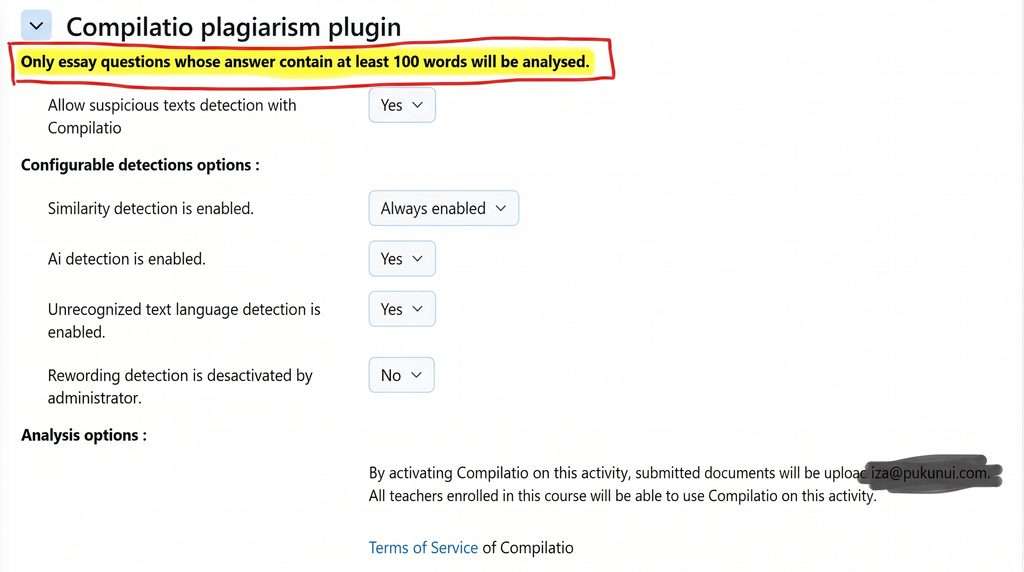
Compilatio requires an analysed document to contain between 100 and 300,000 words. Documents that fall outside this range are not eligible for analysis.
When using Compilatio with Moodle Quizzes, each Essay question response is treated as an individual document for analysis.
This means two important things:
- Each Essay question is evaluated separately: Compilatio checks each Essay response individually rather than combining answers from multiple questions. For example, if a student writes 180 words across two Essay questions (90 words each), neither response meets the minimum 100-word requirement.
- Short responses are excluded: Responses containing fewer than 100 words are not submitted for similarity analysis and will not generate a Compilatio report.
For example, in Compilatio Magister, you may notice that processed Quiz responses appear in the document folder, while shorter responses are missing.
Similarly, on the Moodle Quiz Results page, you may see Compilatio similarity indicators and a report link for eligible responses, while shorter responses have no corresponding report.
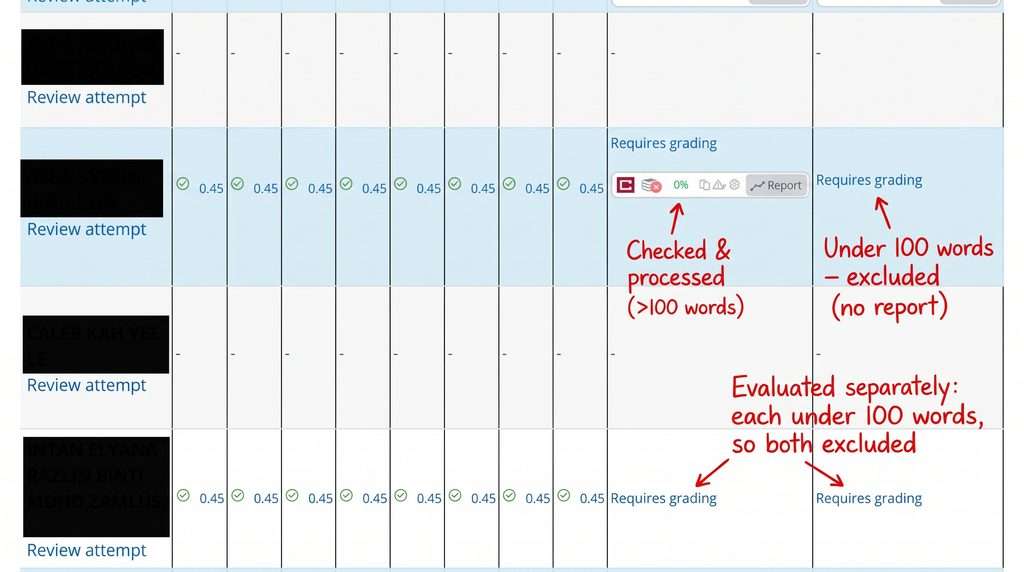
The important distinction: A missing similarity report does not automatically mean that the plugin is malfunctioning. The response may simply be below Compilatio’s minimum word count.
Step-by-Step: How to Set a Minimum Word Count for Moodle Essay Questions
Moodle has a built-in minimum word count setting for Essay questions. This feature alerts students when their responses are shorter than the required number of words.
Setting an appropriate minimum helps students understand the expected response length before completing their quiz.
Follow these steps:
- Open your Quiz activity in Moodle and navigate to the Questions tab. Alternatively, access the question directly through the Question Bank.
- Click the Edit icon (gear or menu) next to the relevant Essay question.
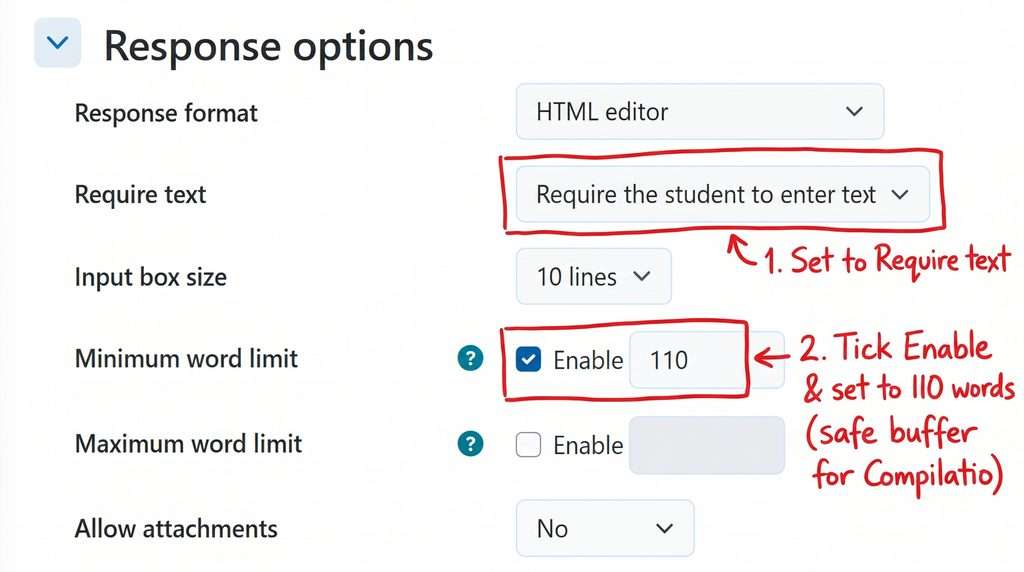
- Scroll down and expand the Response options section.
- Set Require text to Require the student to enter text if you want students to provide a written response.
- Locate Minimum word limit and tick the Enable checkbox.
- Enter 105 or 110 in the minimum word limit field.
- Scroll to the bottom and click Save changes.
Pro Tip: Allow a 5–10 Word Buffer
Although Compilatio’s minimum requirement is 100 words, we recommend setting Moodle’s minimum word limit to 105 or 110 words.
This provides a small buffer to reduce the risk of responses falling below the required threshold due to differences in word-count calculations.
Important: Moodle’s minimum word count setting provides a warning to students; it should not be treated as a guaranteed submission restriction. If your assessment requires a strict minimum, consider adding clear instructions and an appropriate review process.
Bonus Tips for a Smoother Student Experience
Beyond setting a minimum word count, here are three additional considerations when designing Moodle Quiz Essay questions.
1. Check Your Text Editor Configuration
The text editor used in Moodle can affect the writing experience.
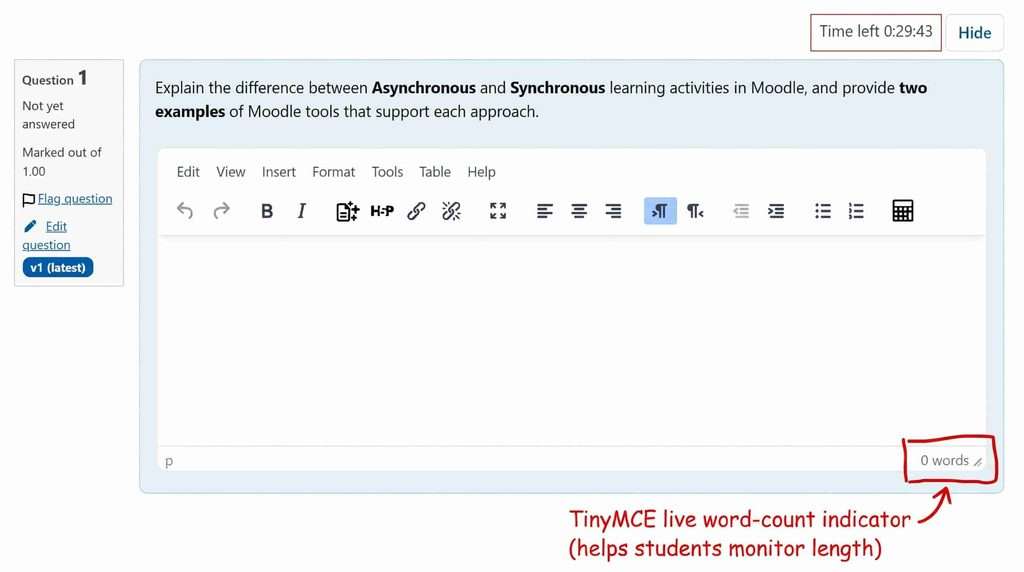
If you use TinyMCE, check the available editor features and configuration to determine whether a word-count indicator is available on your site.
A visible word count can help students monitor their responses as they write, reducing the likelihood of submitting answers that are too short.
2. Consider Combining Related Short Questions
If you are designing Modified Essay Questions (MEQs) where each sub-question only requires 60–80 words, consider whether related parts can be combined into a single Essay question.
For example, students could answer Part A and Part B in one response box, using clear labels to distinguish their answers.
This allows the combined response to be assessed as one document, provided it meets Compilatio’s minimum word count.
However, consider the assessment design and marking requirements before combining questions. Separate questions may still be more appropriate when each response needs an individual mark or assessment criterion.
3. Test Your Quiz Before Publishing
Before making your quiz available to students, preview the assessment and test the Essay question settings.
Check that:
- The minimum word count is enabled.
- The expected warning appears when a response is too short.
- Students understand the required response length.
- Compilatio is enabled for the Quiz activity.
- Eligible responses are successfully submitted for similarity analysis.
Testing the complete workflow helps identify configuration issues before students begin their assessments.
Key Takeaways for Moodle Administrators and Educators
When using Compilatio with Moodle Quiz Essay questions, remember these important points:
- 100 words is the minimum: Compilatio requires analysed documents to contain at least 100 words.
- Each Essay response is checked individually: Words from separate Essay questions are not combined to meet the minimum requirement.
- Use Moodle’s built-in word count setting: Set a minimum of 105–110 words to provide a buffer.
- Communicate expectations clearly: Inform students about the minimum response length before they attempt the quiz.
- Test before publishing: Verify both Moodle’s word count warning and the Compilatio analysis workflow.
Understanding these requirements can help educators avoid unnecessary troubleshooting and ensure that eligible student responses are submitted for similarity analysis.
Need Help Optimising Your Moodle Assessments?
Getting the most out of Moodle requires more than simply setting up activities. It also involves configuring the right tools, assessment workflows and integrations to support effective teaching and learning.
Whether you need help configuring Compilatio, optimising Moodle Quiz activities, integrating educational plugins or training lecturers to use Moodle more effectively, Pukunui Malaysia is here to help.
Our team provides Moodle LMS hosting, technical support, consultancy and professional training to help organisations make the most of their eLearning platforms.
Contact Pukunui Malaysia to speak with our Moodle specialists about your LMS requirements.
