

Post-Webinar Insights from the Ninth #LearnWithPukunui Webinar: How Medical lecturers Used Moodle Assignment Activities to Support Clinical Competency Assessment and Digital Logbooks.
Work-based learning presents a different set of assessment challenges from conventional classroom-based education. Students are expected to demonstrate their knowledge, practical skills, professional behaviour and competencies in real working environments. Educators, meanwhile, need to observe, assess, provide feedback and keep track of each student’s progress.
In programmes such as medicine and other health professions, this process can involve multiple clinical placements, mentors, supervisors and competency requirements. Traditionally, much of this evidence has been recorded in paper-based logbooks, making it difficult to monitor, verify and manage assessment records across different locations.
What if an institution could bring this entire process into its existing Learning Management System (LMS)?
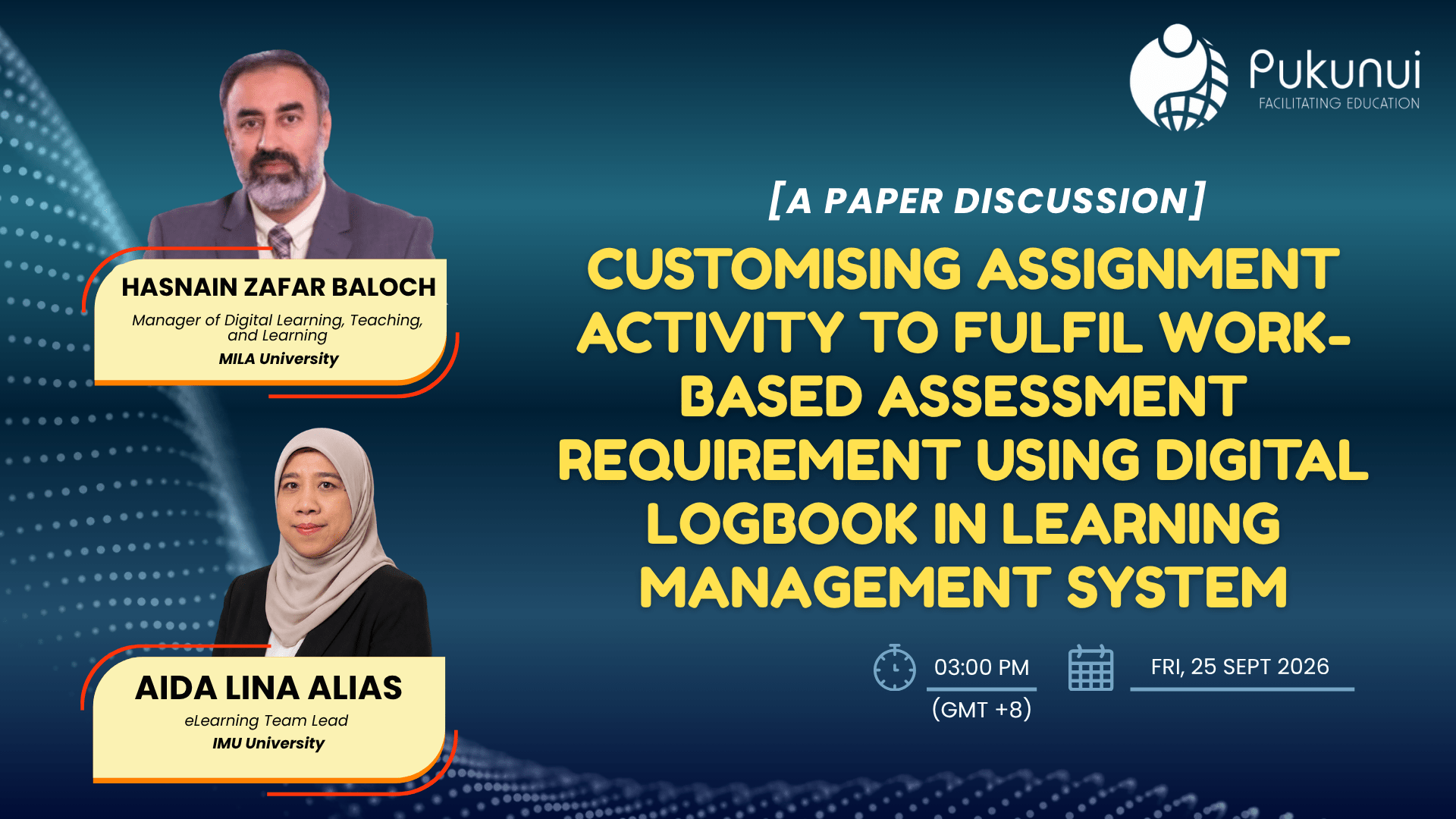
This was the focus of Pukunui’s ninth #LearnWithPukunui webinar of 2026, Customising Assignment Activity to Fulfil Work-Based Assessment Requirements Using Digital Logbook in Learning Management System.
The paper discussion featured Hasnain Zafar Baloch, Manager of Digital Learning, Teaching and Learning at MILA University, and Aida Lina Alias, eLearning Team Lead at IMU University. The speakers shared their experience in transforming Moodle Assignment activities into a digital logbook to support work-based assessment, particularly for clinical education.
Their experience demonstrates how existing Moodle functionality can be configured and combined to address complex assessment requirements without necessarily introducing an entirely separate system.
Why Work-Based Assessment Needs a Different Approach
Work-based assessment takes place beyond the conventional classroom. Students learn through practical experiences, professional interactions, workplace activities and real-world situations.
In clinical education, for example, students may be required to:
- Attend clinical placements and complete assigned activities.
- Document patient encounters and clinical experiences.
- Demonstrate specific clinical competencies.
- Record their professional behaviour and conduct.
- Participate in mentor or supervision sessions.
- Submit evidence of their learning and performance.
- Receive feedback and demonstrate improvement.
These requirements create a continuous assessment process. Students need to collect evidence throughout their placements, while educators and mentors need to verify that the required competencies have been achieved.
A paper-based logbook can make this process difficult to manage. Records may be scattered across different documents, feedback can be delayed, and programme coordinators may struggle to obtain an overall picture of student progress.
Hasnain explained that these challenges prompted the team to explore how Moodle could be used to support clinical competency tracking and assessment.
Instead of developing a completely new system, the team looked at Moodle as the central platform for managing teaching and learning activities.
Turning Moodle Assignment into a Digital Logbook
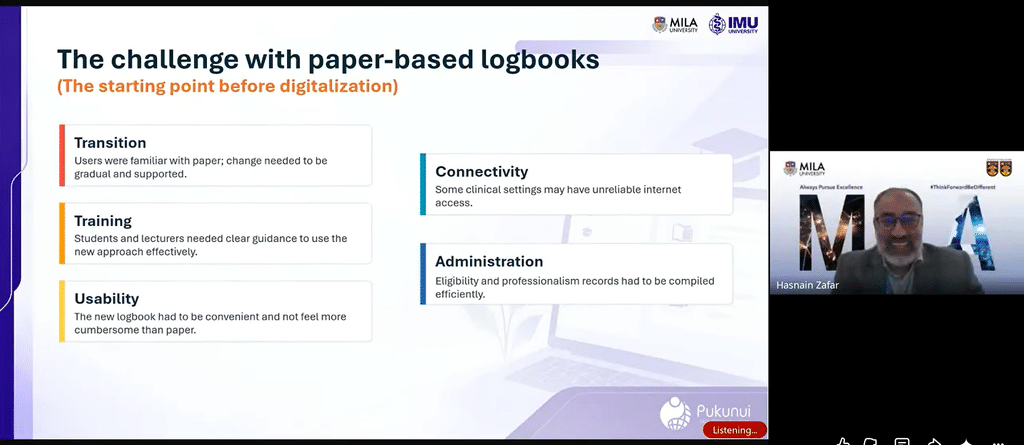
The project began with a relatively straightforward idea: use Moodle Assignment activities to record and assess students’ work-based learning experiences.
With the support of the eLearning team, the standard Assignment activity was configured to accommodate the requirements of clinical postings and competency-based assessment.
Each assessment requirement could be represented by an assignment activity. Students would then submit the required evidence, while mentors could review the submissions, provide feedback and record assessment outcomes.
This approach brought several components of the assessment process together:
- Moodle Assignment for collecting student submissions and evidence.
- Gradebook for consolidating assessment results.
- Activity completion and progress tracking for monitoring outstanding requirements.
- Groups and groupings for organising students and managing mentor access.
- Feedback and grading workflows for supporting assessment and follow-up.
The result was a digital logbook that could support the documentation and monitoring of student learning throughout clinical placements.
Importantly, the project did not depend on a single additional ePortfolio platform. The team used Moodle’s existing activities and features to create a workflow that addressed its specific assessment requirements.
How the Digital Logbook Works in Practice
During the webinar, Aida shared screenshots demonstrating how the team configured Moodle features to support the digital logbook workflow.
1. Moodle Assignment as the Assessment Activity
Each assessment requirement was created as a Moodle Assignment activity.
Students used the assignment to record and submit written evidence of their learning and performance. Mentors could then review the submission, provide a grade and give feedback.
For example, Aida showed an assignment structure used for a surgery posting.
By keeping these records within Moodle, students and educators could access the relevant assessment information throughout the posting rather than relying on physical logbooks being passed between individuals.
2. Using Groups and Groupings to Manage Mentors
Work-based assessment often involves multiple mentors supervising different groups of students.
Managing access becomes important when mentors should only be responsible for reviewing particular students or submissions.
To address this, the team used Moodle Groups and Groupings to organise students according to their assessment and supervision arrangements.
This allowed mentors to focus on the students assigned to them, while school administrators could retain an overall view across the different mentor groups for monitoring and reporting.
The configuration also helped manage access according to user roles and responsibilities.
3. Making Student Progress Visible
A digital logbook should do more than store submissions. Students and educators need to know what has been completed and what remains outstanding.
The team used Moodle’s Completion Progress block to make assessment progress more visible.
Students could quickly identify completed activities and outstanding requirements. This helped them understand what they needed to complete next and take greater responsibility for their progress.
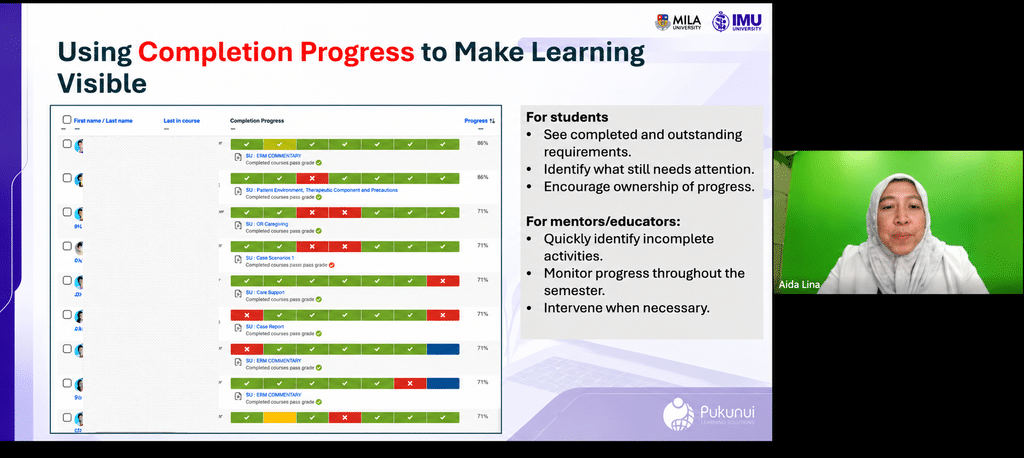
For mentors and educators, the same information provided an opportunity to identify students who were falling behind.
Rather than waiting until the end of a clinical posting or semester, educators could follow up earlier and provide the necessary support.
4. Using Gradebook to Consolidate Assessment Results
The Moodle Gradebook played another important role in the digital logbook implementation.
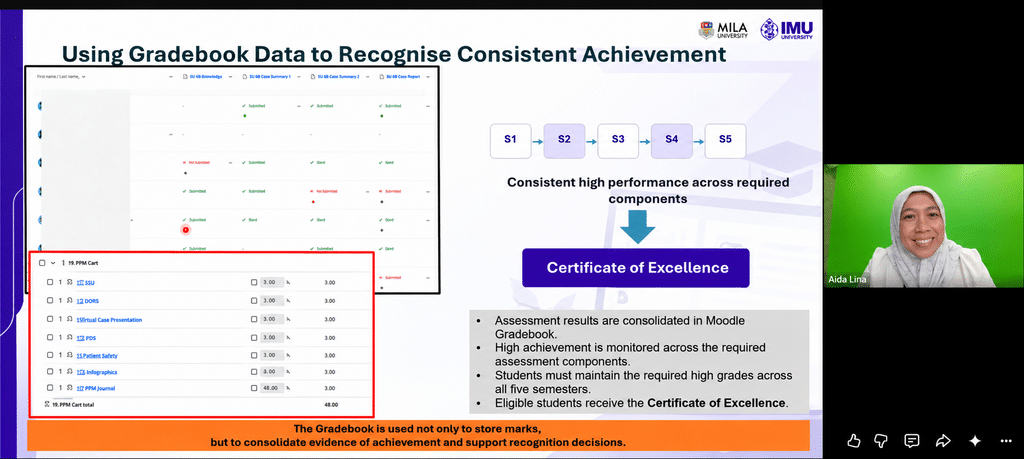
Rather than using it only to store individual marks, the team used Gradebook calculations to consolidate assessment results across different activities.
This was particularly useful for monitoring achievement over multiple semesters.
Aida shared an example involving the Certificate of Excellence, where students needed to maintain a high level of achievement across five semesters.
By combining relevant assessment results through Gradebook calculations, coordinators and school administrators could identify students who met the required criteria.
This demonstrates how Gradebook can support not only assessment recording but also recognition of consistent student achievement.
Supporting Multiple Stakeholders in Work-Based Assessment
One of the important advantages of the digital logbook was that it supported more than just students and their immediate mentors.
Hasnain highlighted how different stakeholders could benefit from having assessment information managed within one central platform.
| Stakeholder | How the digital logbook supports them |
|---|---|
| Students | Submit evidence, monitor outstanding activities and review feedback. |
| Mentors and assessors | Review submissions, verify evidence and provide feedback. |
| Faculty members | Monitor competency achievement and support student development. |
| Programme coordinators | Track progress across students, postings and competencies. |
| School administrators | Access consolidated reports and monitor overall programme performance. |
This was particularly relevant when students were placed in external clinical settings. Assessors outside the institution could participate in the assessment process by accessing the relevant activities and providing feedback or approval.
Having these records available digitally also reduced the need to physically transfer paper logbooks between students, mentors and administrative teams.
From Submission to Verification: How Is the Evidence Authenticated?
A question raised during the webinar concerned the authenticity of student submissions.
In work-based assessment, simply uploading a document does not necessarily establish that the activity has been completed or that the evidence is accurate.
Aida explained that students were provided with templates to complete for particular activities, such as patient encounters.
The verification process involved two stages:
- Verification at the workplace: The relevant doctor or supervisor verifies the student’s recorded encounter or activity.
- Mentor review: Once the student submits the evidence through the digital logbook, the assigned mentor reviews it and determines whether the evidence is satisfactory or unsatisfactory.
Hasnain also highlighted the importance of orientation, professional responsibility and ethical conduct. Students need to understand that the information they document must be accurate and that professional accountability remains part of the assessment process.
This is particularly important in clinical environments, where patient confidentiality and data protection must be considered.
The speakers explained that students were not required to record patients’ names and that guidelines were provided on responsible documentation and what information could be collected.
For institutions implementing similar workflows, clear data protection policies, informed consent requirements and guidance on handling sensitive information should be established before the system is introduced.
Combining Digital Logbooks with ePortfolios
An interesting discussion during the Q&A explored whether digital logbooks could be combined with ePortfolios and reflective activities.
Hasnain agreed that these approaches could complement one another.
He described a possible progression:
Learning activities → Assessment and competency tracking → Digital logbook → ePortfolio → Professional portfolio
Moodle can be used to manage learning activities, collect evidence and track competencies through assignment submissions and assessment records.
The collected evidence can then contribute to a broader ePortfolio, where learners can organise their achievements and reflect on their development.
An ePortfolio can also provide a useful way to present professional experience and learning evidence beyond the immediate assessment context. Hasnain noted that portfolio content could be exported into PDF format, including relevant links, for presentation purposes.
This creates opportunities to connect day-to-day learning activities with longer-term professional development.
Measuring Progress Through Dashboards and Recognition
Another benefit highlighted during the discussion was the ability to consolidate student progress into dashboards and reports.
Hasnain explained that progress could be viewed at different levels, from an overall university or school perspective down to individual programmes and competencies.
The team also incorporated gamification and recognition elements to encourage students to complete their required competencies.
For example, achievement information could be used to recognise students who had completed particular competencies or demonstrated a high level of performance.
During the presentation, Hasnain shared an earlier implementation example involving 161 students across five semesters. He also described how the approach had expanded beyond the original medical programme, with interest from the School of Dentistry and other areas.
These examples demonstrate how a structured digital logbook can support monitoring, reporting and recognition across larger cohorts.
Lessons Learned: What Should Institutions Consider Before Implementation?
Moving from paper-based assessment to a digital logbook involves more than configuring Moodle activities.
The speakers shared several practical lessons from their implementation experience.
1. Start with Assessment Requirements
Before choosing the technology, institutions should understand what needs to be assessed.
Identify the competencies, evidence requirements, assessment criteria and approval processes. These should be clearly defined before configuring the Moodle activities.
2. Involve All Relevant Stakeholders
Successful implementation requires collaboration between faculty members, eLearning teams, programme coordinators, administrators and mentors.
The people responsible for conducting and managing assessments should be involved in designing the workflow.
3. Establish Clear Assessment Rules
Assessment requirements, submission expectations and verification responsibilities should be transparent.
Students need to understand what they are expected to submit, how their work will be assessed and who is responsible for reviewing their evidence.
4. Design and Test the Workflow with Users
Hasnain and Aida emphasised the importance of working closely with users.
Aida explained that the eLearning team and faculty members needed to work together, test the approach with students and make improvements before wider implementation.
A pilot can help identify practical issues before the workflow is introduced across an entire programme.
5. Provide Training and Support
Not everyone has the same level of confidence when using digital tools.
While students may be comfortable using mobile devices and online platforms, educators, mentors and programme coordinators may need additional guidance.
Providing appropriate onboarding, training and support can help reduce confusion and encourage adoption.
6. Maintain Accurate Data and Consistent Processes
The quality of reporting depends on the quality of the information being recorded.
Institutions should ensure that submission requirements, competency mapping, grading criteria and assessment workflows are configured consistently.
Accurate data makes it easier to generate meaningful reports and monitor student achievement.
Technology Should Follow the Pedagogy
Towards the end of the webinar, Hasnain shared an important piece of advice for institutions considering similar projects: do not begin with the technology.
Instead, start with the ideas, assessment requirements and clarity of purpose.
He encouraged educators and eLearning teams not to be afraid of experimentation or failure, highlighting that successful implementation is rarely a straight line.
Aida reinforced the importance of collaboration. Instructional designers and eLearning teams cannot develop effective solutions in isolation. They need to work closely with faculty members who understand the subject, the assessment requirements and the practical realities of the learning environment.
This is perhaps the most important lesson from the project.
Moodle provides the tools, but meaningful implementation comes from understanding the learning context, designing the right workflow and bringing the right people together.
Key Takeaways for Educators and Learning Designers
The webinar demonstrated how an existing LMS can be adapted to support more complex assessment requirements.
Here are the key takeaways:
- A digital logbook does not always require a separate system. Moodle Assignment, Gradebook, Groups and completion tracking can be configured to support structured work-based assessment.
- Evidence collection should be connected to verification. Student submissions need appropriate review, feedback and approval processes.
- Progress visibility benefits everyone. Students can monitor their own requirements, while mentors and administrators can identify outstanding activities and competencies.
- Assessment workflows need careful planning. Clear criteria, user involvement and accurate data are essential for successful implementation.
- Digital logbooks can support wider portfolio development. Assessment evidence can contribute to ePortfolios and longer-term professional portfolios.
- Successful digital transformation requires collaboration. Faculty members, instructional designers, eLearning teams and institutional leaders need to work together.
Ultimately, the goal is not simply to replace a paper logbook with a digital version. It is to create a more organised, transparent and evidence-based assessment process that supports students throughout their learning journey.
Watch the Webinar and Get Your Certificate!
Want to explore how Moodle Assignment activities can be adapted to support work-based assessment and digital logbooks?
Watch the recording of Customising Assignment Activity to Fulfil Work-Based Assessment Requirements Using Digital Logbook in Learning Management System, featuring Hasnain Zafar Baloch from MILA University and Aida Lina Alias from IMU University.
The discussion includes practical implementation insights, Moodle configuration examples and lessons learned from transforming clinical assessment workflows.
For institutions looking to explore Moodle-based assessment workflows, competency tracking or digital logbook implementation, Pukunui can help you identify suitable approaches based on your programme requirements.
Contact Pukunui Malaysia: hello.my@pukunui.com
#LearnWithPukunui is Pukunui’s webinar series connecting educators, learning designers and technology specialists to explore practical strategies, tools and innovations in digital education.
